Release Date: 2026-01-10
Cheers!
New year, new wins, and a strategy glow,
Search a one-pager fast — watch the quick results flow.
Follow what matters, keep focus in sight,
Templates stay flexible — turn fields on or off just right.
Here’s to big outcomes in 2026 — may your plans land, your teams align, and everything goes bright!
✨ New Features
Strategy & alignment workflows
- Cascade a single initiative to multiple pillars within one one-pager: Initiatives can now be cascaded to more than one pillar within a one-pager, supporting real-world execution where a team supports an initiative with more key areas.
Navigation & discoverability
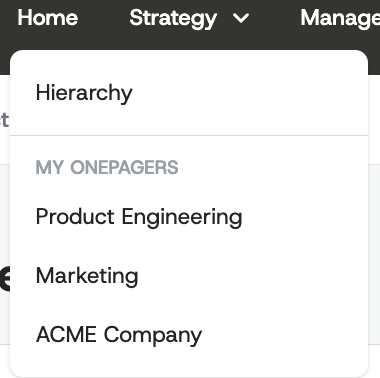
- Quick access to “My one-pagers” from the Strategy menu: The Strategy navigation now includes a dropdown that surfaces up to 10 of your most recently updated one-pagers, letting busy owners jump straight into their active work. This reduces time spent searching and improves adoption by making “what I own” visible from anywhere in the product.
Homepage experience
-
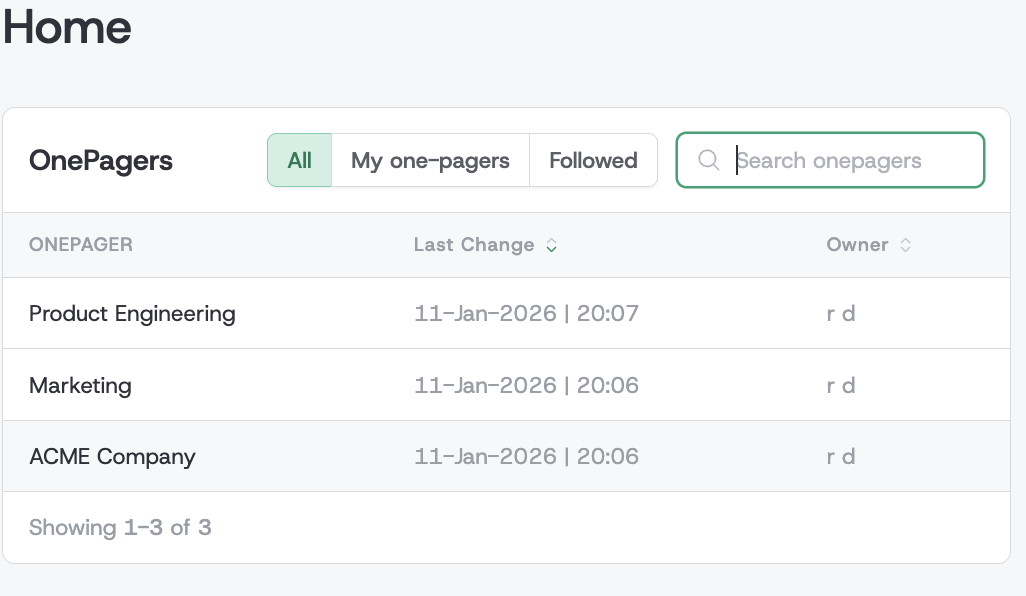
Redesigned homepage with powerful search, filtering, sorting, and pagination: The homepage now uses two side-by-side tables designed for fast scanning and action, helping users find the right one-pager quickly even as content grows. You can search by title, sort by last change or owner, and move through results with pagination—making the homepage a reliable “command center” for ongoing strategic work.
-
Dedicated homepage table for “My one-pagers” and “Followed” views: The one-pagers table now supports fast toggles (All, My one-pagers, Followed) so each user can instantly focus on content they own or actively track. This improves day-to-day usability for executives and owners alike, especially in organizations where hundreds of one-pagers exist across levels.
Template customization
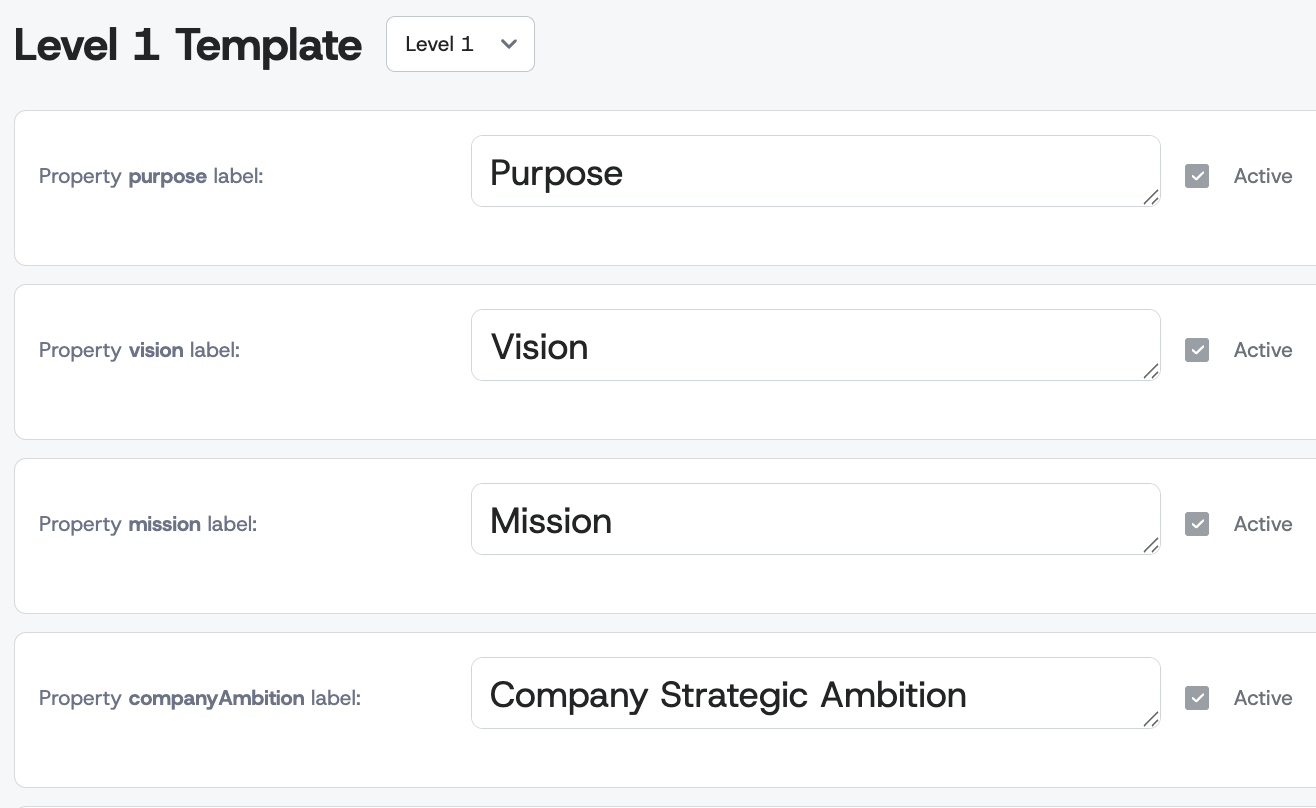
- Template Editor: toggle fields on/off with a new “Active” control (data preserved): The Template Editor now includes an “Active” checkbox for supported fields, enabling admins to hide or show one-pager fields without deleting existing content. Typically, admins would decide on use of entities like Enablers across levels.
🔧 Improvements
Reporting & review workflows
-
Strategy Completion Report now matches the hierarchy ordering users expect: The report’s level details now sort in the same intuitive order as the strategy tree, making review meetings smoother and reducing time spent reconciling “why this looks different here.” Level 1 items sort alphabetically, while deeper levels group under their superior one-pager and sort consistently for easier scanning and action planning.
-
Fewer false “incomplete” statuses in the Strategy Completion Report: The report no longer includes a completeness check for a field that cannot be edited in the user interface.
One-pager editing reliability
- More responsive inline edits for one-pager fields during day-to-day updates: Inline edits (titles, initiative names, mission text, and similar fields) now update more efficiently and handle edge cases more gracefully, especially when content changes rapidly across linked work. Users experience fewer delays and fewer confusing “conflict-like” behaviors, enabling cleaner collaboration across teams.
Performance
-
Faster propagation status updates for large, highly connected strategy trees: Status updates for incoming and outgoing changes now run with far fewer database roundtrips, which matters most for organizations with many cascading links. Users benefit from quicker refreshes and less waiting when reviewing changes across linked one-pagers, improving the cadence of alignment workflows.
-
Smoother one-pager show experience by removing an unnecessary “versions” load: The one-pager detail view no longer spends time loading historical “changes” data that was not needed for day-to-day work. This improves perceived speed and reduces latency spikes, helping executives and leaders move through strategy content quickly during live reviews.
-
Improved performance of initiative field saves to reduce delays during editing: Saving initiative fields no longer triggers unnecessary heavy reload behavior and uses a more direct lookup for the right content location. Users experience faster edits, less UI “pause,” and better flow when updating initiatives in rapid succession during meetings or weekly check-ins.
-
More scalable one-pager index loading for large organizations: The index view now avoids loading unnecessary related data when listing one-pagers, which reduces initial load time and improves responsiveness. Users see quicker list rendering and smoother switching between views, supporting faster discovery and navigation across many strategic items.
🔒 Security
- More reliable password reset user lookup behavior: The password reset flow now performs user lookup more efficiently and consistently, reducing the chance of edge-case failures under load. Users experience a smoother recovery process, and customer success teams benefit from fewer “reset didn’t work” support tickets in high-usage periods.
🎨 UI/UX Enhancements
-
Owner dropdown is now easier to use with large user lists (search + sensible defaults): The owner selector no longer overwhelms users with an extremely long list; it shows a manageable set first, keeps the current owner visible, and supports searching as you type. This reduces mistakes during reassignment, speeds up administrative work, and makes delegation workflows feel modern and predictable.
-
Cleaner empty state when filtering to followed one-pagers: When users apply the “Followed” filter but have not followed anything yet, the interface now shows an appropriate empty state instead of a confusing or misleading view. This helps onboarding, clarifies what action to take next, and reduces “is it broken?” moments for new users.
-
Clearer cascade status indicator in view mode: A new cascade badge in view mode helps users immediately understand when a one-pager is involved in cascading relationships. This supports faster comprehension during reviews and reduces the need to click around to confirm whether content is linked across levels.
-
More discoverable “Hierarchy” access via Strategy top navigation styling: The top menu now presents the Strategy/Hierarchy access more clearly, improving navigation confidence for non-technical stakeholders. Users can reach the strategy structure faster, supporting smoother facilitation during meetings and enabling quicker self-service exploration.
-
More consistent modal sizing for better readability and fewer cramped dialogs: Default modal width has been adjusted to better fit typical business content, improving readability of forms and reducing unnecessary line-wrapping. Users can complete tasks more comfortably, especially when editing structured strategy content that benefits from wider layouts.
-
Better text wrapping in one-pager input fields (handles non-breaking spaces more predictably): Text entry for one-pager titles, pillar names, and initiative fields now wraps more reliably in edge cases, avoiding awkward overflow that can hide important words. Users benefit from cleaner editing and fewer layout surprises when pasting content from other tools that include special spacing.
-
Accepted unlink requests now follow the same governance flow as other cascading changes: Unlinking an already accepted cascading connection no longer removes the link immediately; it now behaves like a change that must be propagated and accepted. This prevents accidental breakage of alignment, supports auditability in governance processes, and ensures teams intentionally approve structural strategy changes.