Release Date: May 12, 2026
Cheers!
🎵 Lucky thirteen brings a compass to find your way,
Follow your colleagues, watch the changes at play,
Evaluate, align, and let your strategy hold sway! 🎵
✨ New Features
Strategy Evaluation Report
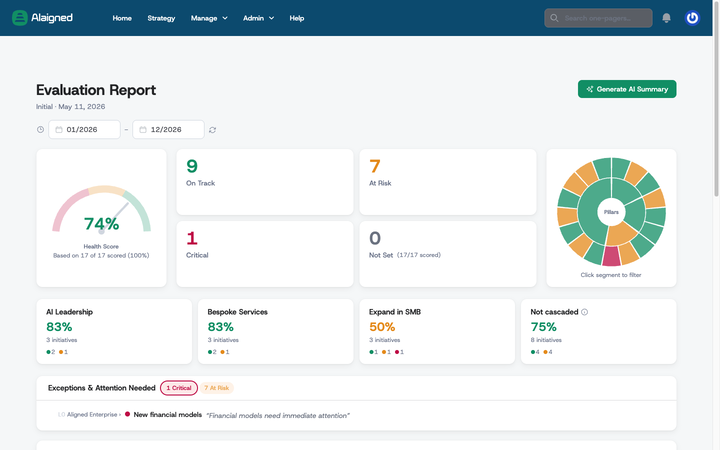
- Redesigned dashboard: The flat execution table is replaced by an analytics dashboard — health-score gauge, On Track / At Risk / Critical KPI cards, an interactive sunburst, an "Exceptions & Attention Needed" panel, status-by-level bars, and a filterable initiative tree.
-
Streaming AI executive summary: Generate an executive-style narrative in its own view that streams in progressively, links straight to initiatives, and is scoped to the subtree you're evaluating. Available to admins only — collaborators can still view the report itself.
-
AI summary in your strategy's language: For non-English strategies the executive summary now renders in the team's language first, then the English version — keeping the briefing polished for global teams.
Strategy administration
-
Mandatory fields in the Template Editor: Admins can mark any field as mandatory from the template editor checkbox, defining "what good looks like" per organization; the approval guidance tooltip then lists exactly which mandatory fields are still empty.
-
Archive and unarchive strategy versions: Archive an inactive version to make it fully read-only — no edits to one-pagers, propagations, comments, ratings, or settings — and unarchive it later.
-
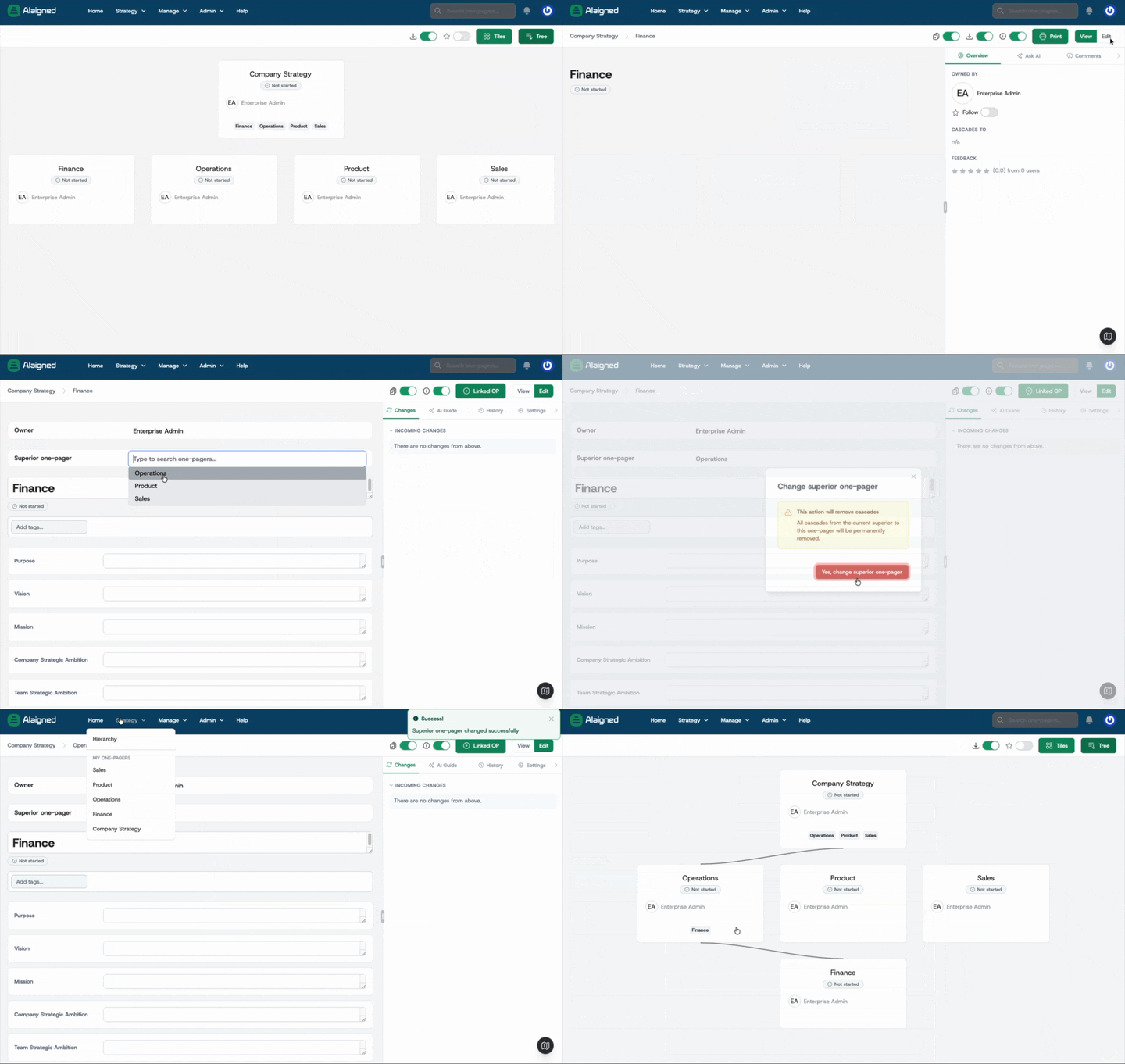
Move a one-pager to a new superior: Move a one-pager and its entire subtree under a different superior one-pager from the edit view, restructuring the hierarchy without rebuilding content.
- Safer one-pager deletion: The delete dialog lists every cascade-deleted descendant by title and requires typing the one-pager's title before the confirm button enables, so the blast radius is the first thing you see.
Working with a one-pager
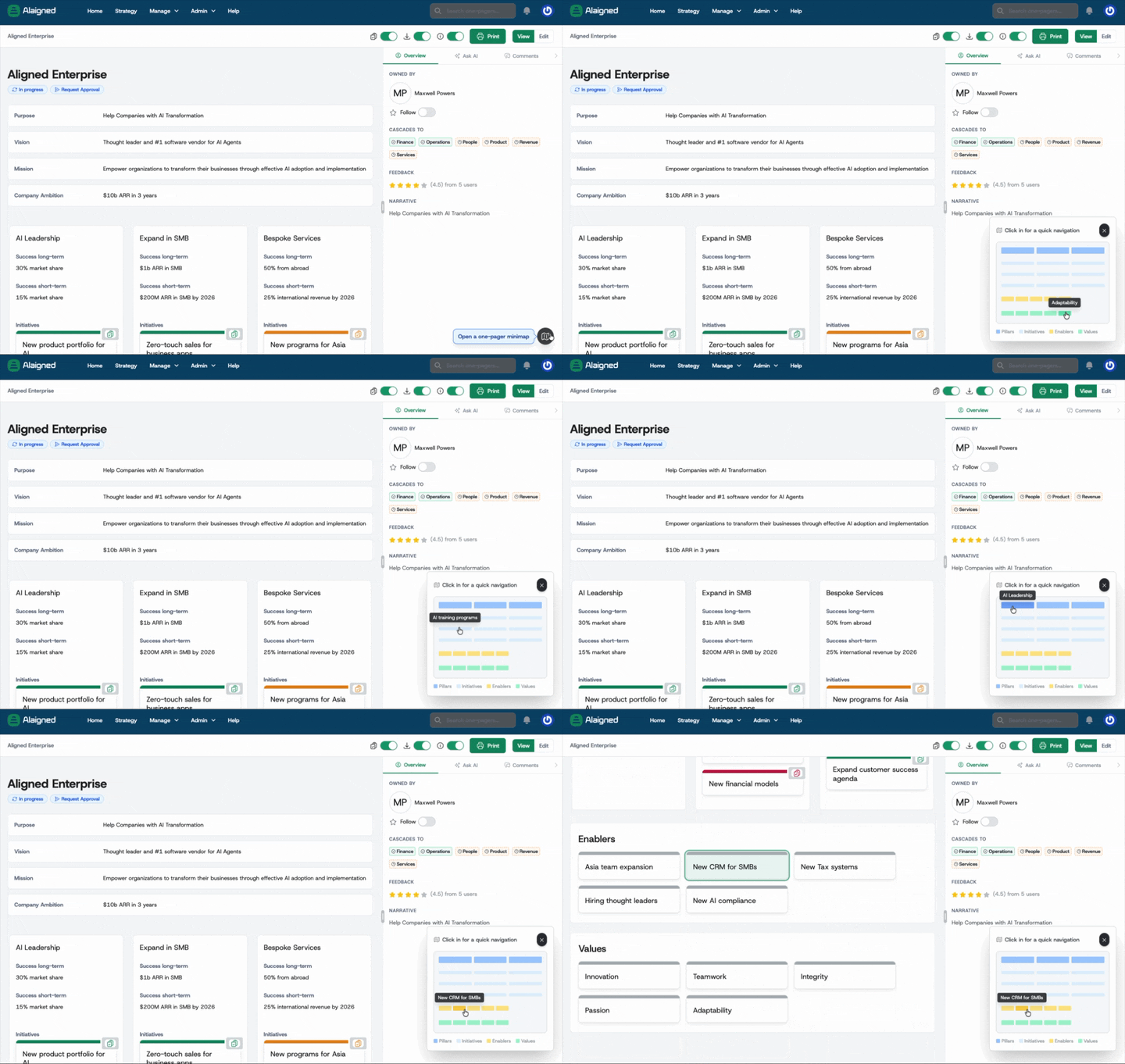
- Floating compass minimap: A compass button in the bottom-right corner opens a semi-transparent minimap overlay; click any pillar, initiative, enabler, or value to jump straight to it — handy on large one-pagers.
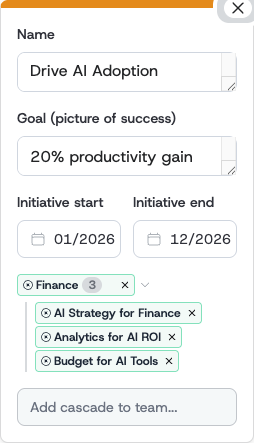
- Cascade fold: Multiple cascades into the same one-pager fold into a single "folder" so dense cascade areas stay scannable, with the option to remove individual cascades or the whole folder.
Collaboration
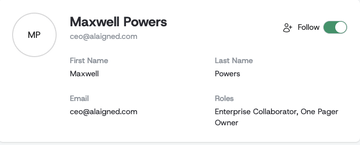
- Follow colleagues: A "Follow" / "Following" toggle on every user profile, plus Followers and Following lists. Followers get bell and daily-digest updates when the followed person edits one-pagers or comments — no need to browse each document.
- Strategy Pulse on the Home page: The "Recently changed" panel becomes a Strategy Pulse feed showing aggregated activity — content changes, comments, propagations — with filter tabs, actor avatars, and pagination.
🔧 Improvements
Propagation review
- Redesigned Changes tab: The Changes tab in the insight bar is split into purpose-built sections — Outgoing Changes, Awaiting Acceptance, Rejected by Children, Incoming Changes, Rejected Changes — each with its own actions, and every card shows who made the change. "Needs mapping" is renamed to the clearer "Pending propagation" throughout.
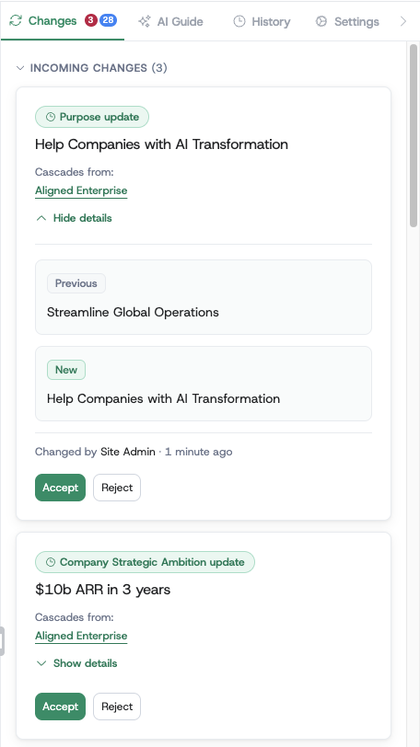
- Spotlight navigation: Clicking a propagation card, a cascade badge, or an initiative link in the AI summary now lands you on the right one-pager and highlights the exact item — and when you're editing, those links open the destination directly in edit mode.
Strategy versions
-
Version-scoped template configuration: Each strategy version now carries its own methodology, so template editor changes apply only to that version and don't affect historical ones; the template editor gains a version picker.
-
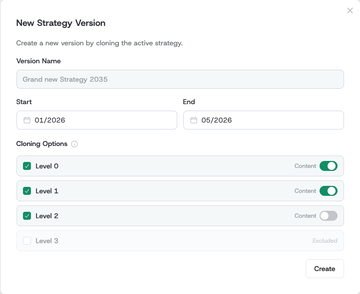
Strategy version date ranges: Strategy versions now support start and end dates with month pickers, anchoring reporting periods and providing fallback timing for the roadmap and Evaluation Report.
-
Selective level cloning when creating versions: The New Version flow lets admins choose which one-pager levels to clone and whether each carries full content or just structure; excluded levels drop all deeper levels too.
- Version picker on Home and Search: Home and Search now offer the same strategy-version switcher as the one-pager views, and navigation preserves the selected version so you stay oriented across the app.
Other improvements
-
View/edit toggle on the one-pager: Switch between read-only and edit modes from the same page; the toggle stays disabled when editing isn't allowed (locked or archived).
-
Reports scoped to your owned subtree: Strategy reports are now available to one-pager owners (not just admins) and show only the subtree they own; owners of several unrelated subtrees get a selector.
-
Daily digest emails delivered: The morning notification digest is now scheduled and reliably sent each day.
🎨 UI/UX Enhancements
-
Faster initiative entry: Creating a new initiative now auto-focuses its name field, matching how pillars, enablers, and values already behave.
-
Wide admin tables scroll horizontally: The Organizations and enterprise-accounts tables now scroll sideways instead of truncating, improving readability on narrower screens.
🐛 Bug Fixes
-
"Create Pillar" no longer double-creates or crashes: The button is disabled while processing, preventing a double click from creating two pillars or erroring.
-
SSO users can be assigned as one-pager owners: Owner reassignment now works for SSO-provisioned users, and inconsistent historical ownership records can be repaired from the UI.
-
Untitled one-pagers no longer break selectors: Parent or linked one-pagers with no title now show as "Untitled" in cascade and reparent dropdowns instead of crashing the picker.
-
Longer one-pager comments: One-pager comments are no longer capped at 255 characters.