Release Date: September 29, 2026
Cheers!
🎵 Fifteen rounds and the calendar's clear,
Governance marks the phases of the year,
Permissions hold what we hold dear! 🎵
✨ New Features
Strategy Governance
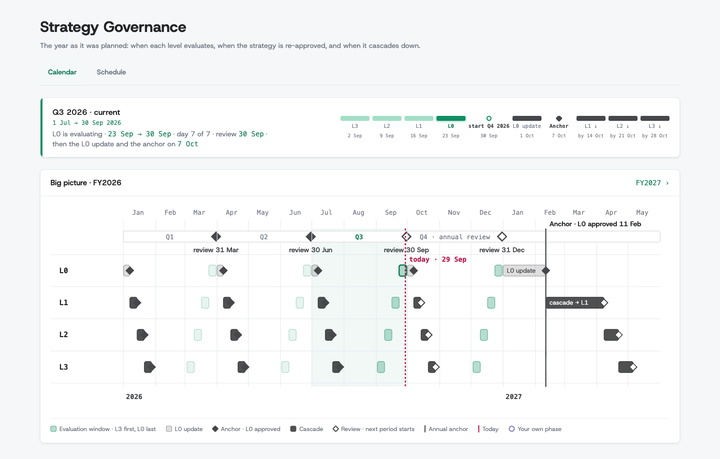
- Strategy Governance calendar: A read-only year view under Manage, showing planned periods and each level's phases against today's date.
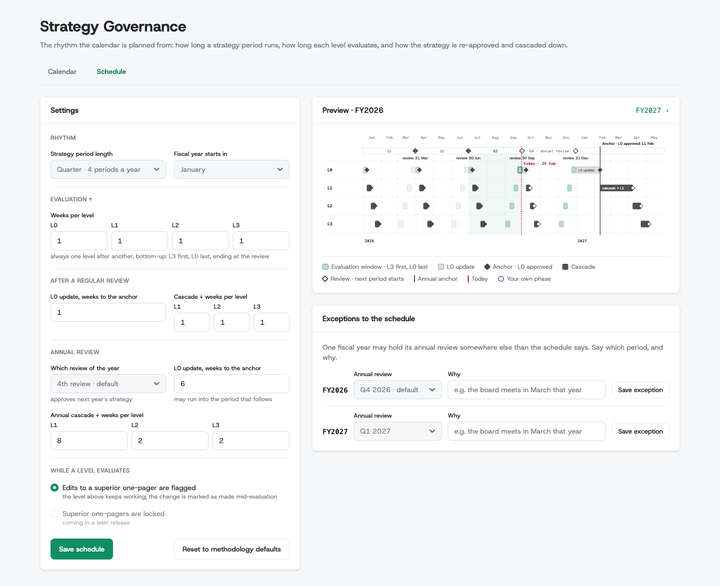
- Governance schedule settings: Set cadence, fiscal year, and the annual-review exception, with a live preview of the resulting calendar before you save.
Strategy administration
- Program managers manage versions: The role's promised version rights are now enforced, so a program manager can create, clone, rename, activate, archive, unarchive, and delete versions. The role can also create a root one-pager by hand.
🔧 Improvements
Working with a one-pager
-
A word before you overfill a pillar: Adding past the recommended number of pillars or initiatives now explains the guidance and lets you continue deliberately.
-
Removing an enabler asks first: A confirmation modal re-checks what cascades from the enabler, so linked work is never dropped by a stray click.
-
The strategy version is always in view: The active version's name sits above the one-pager title in view, locked, and edit modes.
Exports
- PDF exports match the page: Prints your workspace's own section names, the strategic ambition in context, and each pillar's success definition.
Strategy Evaluation Report
- A summary that reads like a manager wrote it: The AI executive summary keeps consistent Czech headings, a managerial tone, and no raw links.
🔒 Security
-
SSO configuration hardened: The stored client secret is never echoed back into the form, every change is authorized, and enabling SSO requires a passing connection test.
-
Permissions re-checked on every step: Route permissions are verified on each navigation, listing users needs the user-management right, and creating, viewing, printing, or cloning a one-pager honors your rights.
-
Organization settings need admin rights: Changing an organization's name, domain, logo, or two-factor setting now requires the enterprise-management permission, not just a signed-in user.
-
Smaller attack surface: Unused front-end scripts are gone and scripts may load only from the app's own origin. A dependency update also stops deeply nested one-pager text from crashing the server.
🎨 UI/UX Enhancements
- Compact Company Admin header: Badges carry the active version, user count, and tier, and the tabs gained icons, giving the table underneath room to breathe.

-
Manage versions, one click away: The version switcher links straight to version management instead of making you find it in the menu.
-
Pillars accept a drop anywhere: An initiative can be dropped across the pillar's whole height, not just onto the cards already in it.
-
The product says "cascade": Every screen, button, and message now uses the one word, matching the methodology.
-
Tooltips no longer hidden: The pinned Actions header in admin tables stops covering the tooltips of the first row.
-
AI surfaces have their own accent: Ask AI and the AI Guide carry the secondary brand color against a dark top bar.
⚡ Performance
-
Strategy completion report: Loads only the accountable owner it displays, cutting queries sharply on large hierarchies.
-
Cascade flow: Reads each cascade's rows in batches instead of one at a time, shortening cascade and review operations.
-
Approvals: Reads each level's methodology once per approval rather than per item, speeding bulk approve and revoke.
-
Template saves: Saving a template field no longer re-reads the methodology for every field on the form.
🐛 Bug Fixes
-
Approvals follow the active version: The Approvals tab lists and acts on the active strategy version only, matching what the one-pager shows.
-
One Program Manager role, not two: The new-user dialog no longer offers a duplicate Program Manager that could not open any one-pager; existing workspaces are repaired.
-
Cascades survive a missing source: Rejecting or re-pathing a cascade whose source is gone no longer fails, and explains what happened.
-
One daily digest per day: The digest is sent once across the cluster, and its footer points at a support address that exists.
-
PDF export cleans up after itself: Export no longer leaves headless browser processes behind, and each instance keeps its own profile.
-
Audit cleanup stays in its tenant: The audit-log cleanup job judges retention by the tenant it is running for.