Release Date: 2025-08-22
Cheers!
In the world of planning, we strive to align,
With new features and fixes, our tools will shine!
From toggles to reports, we’re raising the bar,
Join us on this journey, we’re going far!
✨ New Features
Strategy Reporting
-
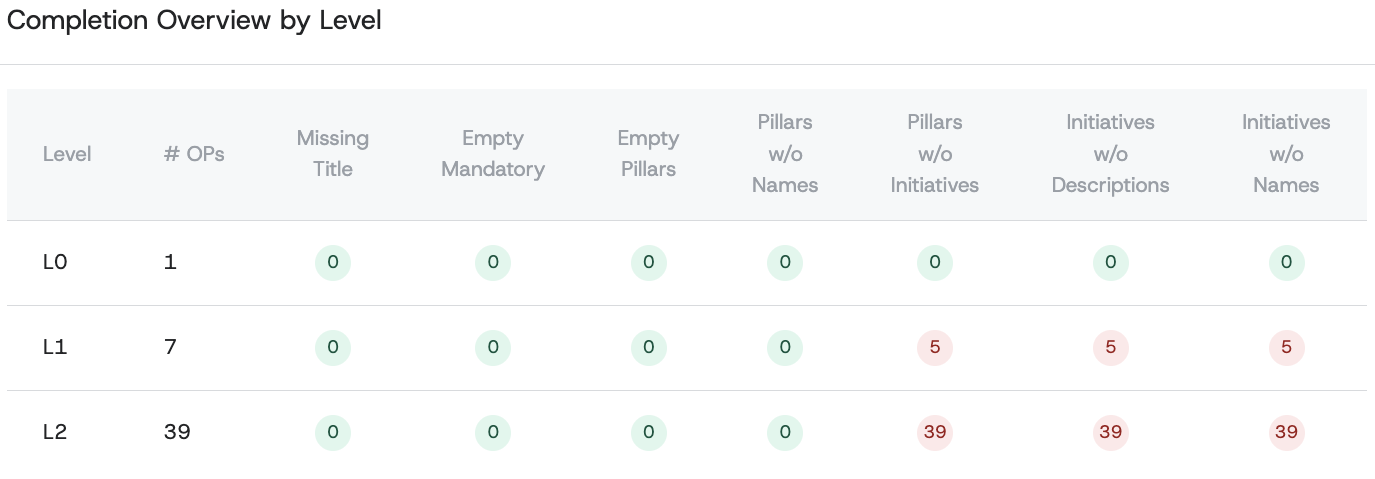
Strategy Completion Report: Eligible roles can now access a detailed report analyzing one-pager completeness across the organization. This feature highlights gaps in strategic planning and execution, empowering teams to address missing critical information effectively.
-
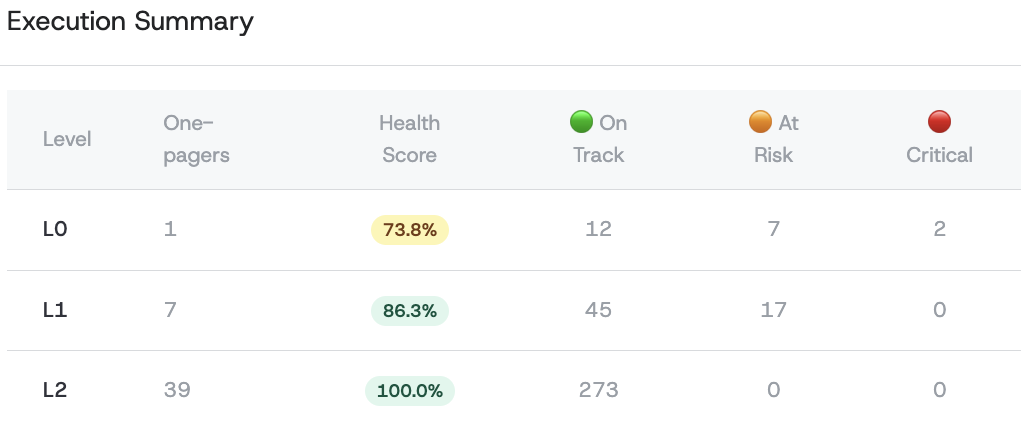
Strategy Execution Report: This new report provides a comprehensive analysis of strategy execution health through a simple red, yellow, or green status across all organizational levels. It helps users identify areas needing attention and track overall execution progress, enabling proactive management of initiatives.
Editing and Configuration
- Template editor for field labels: Organizations can now edit the labels of one-pager fields based on their specific terminology and levels. This makes it easier to adapt strategic content to internal language and improves clarity across teams.
- Initiative editing adjustments: Enhanced initiative editing tools provide greater flexibility and usability. Teams will find it easier to update initiative details without losing context, streamlining the process of keeping strategic content current.
🔧 Improvements
Comment System Enhancements
- Real-Time Comment Updates: The comments functionality has been improved to ensure that comments appear and disappear in real-time without requiring page reloads. This enhancement significantly improves user interaction and engagement with the comments feature.
Custom Deletion Modals
- Pillar Deletion Confirmation Modal: A new confirmation modal prompts users before deleting a pillar, ensuring they are aware of the potential impact on initiatives. This feature enhances user confidence and reduces accidental deletions.
- OnePager Deletion Confirmation Modal: Similar to the pillar modal, this custom modal replaces the default browser confirmation for OnePager deletions, providing a consistent user experience and clearer information about the consequences of deletion.
Visibility Controls
- Review Visibility Toggle: Users can now toggle the visibility of the review color-coding in the context bar, allowing for a cleaner interface tailored to their preferences. This feature enhances user experience by reducing clutter and focusing on the most relevant information.
- Display Logo Setting: Users can now toggle the visibility of their company logo at the one-pager level. This feature allows for greater customization of documents, enhancing brand representation and user experience.
Consistent Column Widths
- Consistent Column Widths: Minor polishing has been applied to ensure consistent column widths across the interface, improving readability and overall aesthetic appeal.