Overview
Alaigned keeps you informed about what's changing across the strategy without you having to go looking. Activity reaches you through three in-app surfaces — the notification bell, the Strategy Pulse on the Home page, and follows — plus a once-a-day email digest.
What you're notified about depends on two things: the one-pagers you own, and the one-pagers and people you follow. You are never notified about your own actions.
What triggers a notification
Notifications are created automatically as a side effect of everyday work. The events that generate them are:
- Content changes — a one-pager's content is edited, or a cascaded change is accepted into it.
- Comments — a comment is added to (or removed from) a one-pager.
- Incoming changes — a cascade from a superior one-pager becomes pending, waiting for the linked one-pager to accept or reject it.
- Ownership transfers — a one-pager's owner is changed.
- Strategy version activation — a different strategy version is made active.
The notification bell
The bell icon in the top navigation bar opens a quick view of recent activity. Click it to see notifications grouped by day, each linking straight to the one-pager it concerns. The View all link at the bottom takes you to the full Strategy Pulse on the Home page.
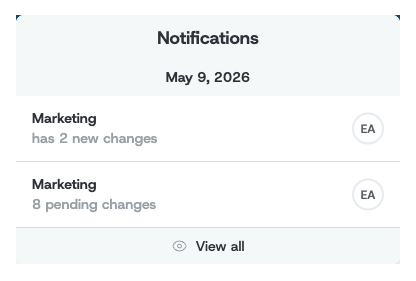
The bell shows activity for the one-pagers you own or follow — it's your personal feed, not an organization-wide one.
Strategy Pulse on the Home page
The Strategy Pulse panel on the Home page is the full activity feed. It lists recent changes with who made them and when, and pages back through history with Show older changes.
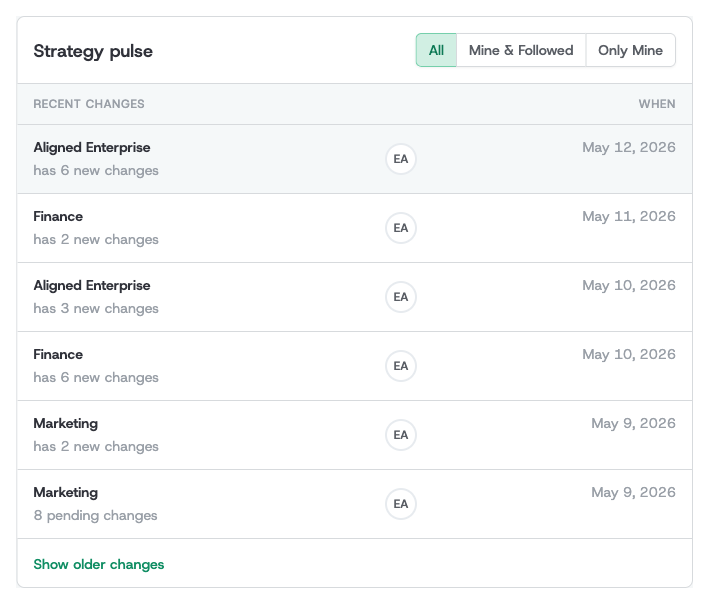
Three tabs control how wide the feed casts:
- All — organization-wide activity. Content changes and comments on every one-pager, plus owner- and version-level events for the one-pagers you own.
- Mine & Followed — only the one-pagers you own or follow.
- Only Mine — only the one-pagers you own.
The Strategy Pulse always spans every strategy version — it's a timeline of activity, so it is not narrowed by the version switcher.
Following one-pagers and people
Following is how you tune what reaches your bell, your Mine & Followed feed, and your digest.
-
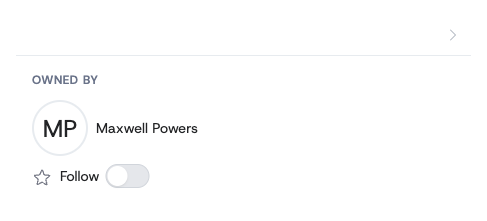
Follow a one-pager — open the one-pager, and on the Overview tab use the Follow toggle. From then on its activity appears in your feeds even if you don't own it.
-
Follow a person — open a user's profile page and use the Follow toggle there. You'll then be notified about content changes and comments on the one-pagers they work on.
Toggle either control off at any time to stop following.
The daily digest email
Once a day, Alaigned emails you a daily digest — subject line "Your Alaigned daily digest" — summarizing the previous day's activity. It collects the day's changes so you don't have to check the app to stay current.
The digest covers the one-pagers you own or follow, and includes:
- A summary count of the day's changes, the one-pagers affected, and the contributors involved.
- A per-one-pager breakdown of what changed.
- A View All Updates link back into the app.
What you see in the digest follows the same rules as the in-app feeds: as an owner you get every type of event for your one-pagers; as a follower you get content changes and comments. There is no separate on/off switch for the digest — you shape it entirely through what you own and follow. On a day with no relevant activity, no digest email is sent.
How long notifications are kept
In-app notifications are retained for 90 days and then removed automatically. The daily digest and the Strategy Pulse always reflect this window.