When editing your one-pager within a hierarchy of one-pagers, there are three types of changes displayed in the Changes tab of one-pager side bar.
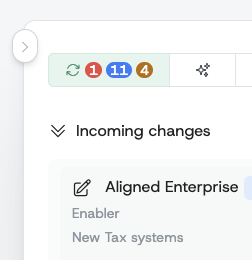
- Incoming changes are in the red circle. They indicate number of changes coming from superior one-pager and that need to be accepted to reflect changes in your one-pager.
- To be propagated changes are in the blue circle. They indicate number of changes you are making in your one-pager and wait to be propagated (propagated) down to your linked one-pagers.
- Awaiting acceptance changes are in the yellow circle. They indicate number of changes you have already propagated while not yet accepted by your linked (inferior) one-pagers.