Alaigned supports rich text formatting using Markdown syntax in several key areas of the platform. This guide will help you create well-structured, professional content that improves readability and presentation.
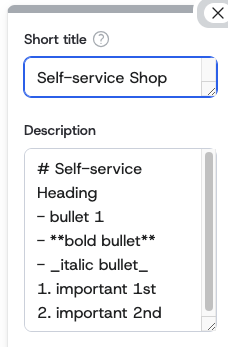
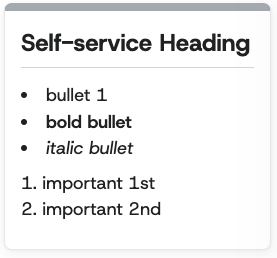
Where Markdown is Available
Markdown formatting is currently supported in:
- Core fields (purpose, mission, etc.)
- Initiatives
- Values
- Enablers
- Pillar names
Additional areas may support markdown in future updates.
Supported Formatting Elements
Headers
Create hierarchical headings to organize your content:
# Heading Level 1
## Heading Level 2
### Heading Level 3
#### Heading Level 4
##### Heading Level 5
###### Heading Level 6
Best Practice: Use headers to create a logical content hierarchy. Start with H1 for main topics, H2 for major sections, and so on.
Lists
Unordered Lists
Create bullet points using -, *, or +:
- Strategic objective one
- Strategic objective two
- Strategic objective three
  - Sub-objective A
  - Sub-objective B
Ordered Lists
Create numbered lists using numbers:
1. First priority initiative
2. Second priority initiative
3. Third priority initiative
   1. Sub-initiative A
   2. Sub-initiative B
Best Practice: Use unordered lists for items without a specific sequence, and ordered lists when the order matters (like priorities or steps).
Text Emphasis
Bold Text
Make text bold to emphasize importance:
**This text is bold**
Italic Text
Make text italic for subtle emphasis:
*This text is italic*
Best Practice: Use bold for key terms, important concepts, or critical information. Use italics for emphasis, definitions, or to highlight specific words.
Code Formatting
Inline Code
Highlight specific terms, values, or short code snippets:
Use the `SMART criteria` when defining objectives.
Set the target value to `85%` for this quarter.
Code Blocks
Format longer code snippets or structured data:
```
Objective: Increase customer satisfaction
Target: 90% positive feedback
Timeline: Q4 2025
Owner: Customer Success Team
```
Best Practice: Use inline code for specific values, metrics, or short technical terms. Use code blocks for structured information, templates, or longer examples.
Blockquotes
Highlight important quotes, principles, or key insights:
> "Quality is not an act, it is a habit." - Aristotle

> **Company Vision:** To transform how organizations align their strategic initiatives with measurable outcomes.
Quote vs Greater Than If instead of quote > format you want to use greater than, you have to use \> instead.