Release Date: 2025-10-07
Cheers!
We locked the page and taught AI to dance,
Badges toggle on — now give your view a chance,
Print, prompts, and profiles — make your strategy advance!
✨ New Features
Collaboration & Content Control
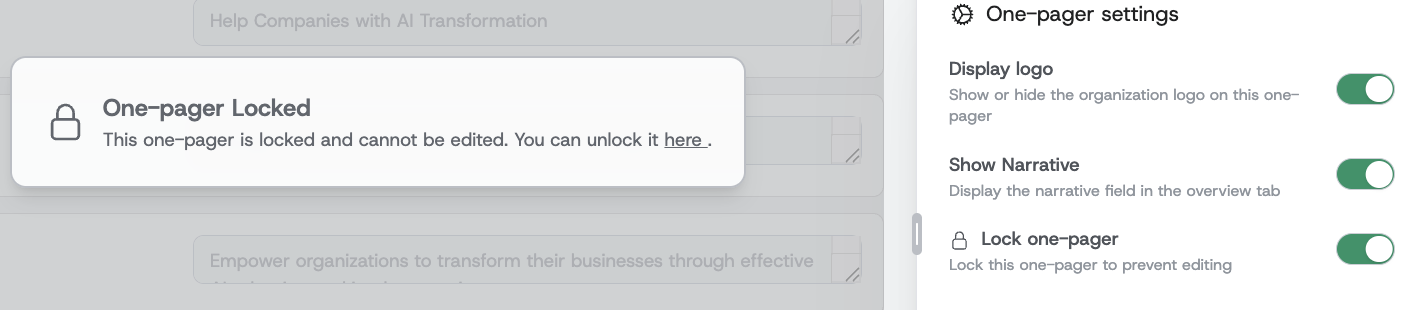
- One-pager locking: You can now lock a one-pager to prevent edits, automatic cascades, and AI recommendations. This protects finalized strategies from accidental changes, enforces editorial control across collaborators, and prevents downstream changes from superiors. Editors retain the ability to propagate changes from locked one-pagers, preserving controlled update flows and governance for key documents.
Consuming Strategy
- Cascade badge visibility toggle: Users can now control whether cascade badges appear on initiative and enabler boxes. This toggle, available in the context bar of the show view, allows for a cleaner visual layout when cascade information isn’t needed. Settings persist across sessions for convenience.
Administration
- Audit logs for enterprise admins: Enterprise administrators now have access to detailed audit logs. Tracked events include logins (successful and failed), logouts, one-pager deletions, and more. This provides enhanced visibility into key actions and supports compliance and accountability efforts. Read more...
- User profile show: Admins can now view and edit user profiles in a layout consistent with company profiles, improving clarity and manageability of user data. This makes user management and troubleshooting faster for admins and ensures profile details are presented consistently across the platform.
- Display roles in user listing: Roles are now visible in the users list, making it easier for administrators to scan and verify user permissions and roles without opening individual profiles. This reduces time-to-action for onboarding and audits by showing role context at a glance.
🔧 Improvements
User Interface
- Resizable insight bar: Made the insight bar resizable so users can adjust the workspace to their preference, improving readability and focus when using the AI Guide, viewing cascades, or editing details. The bar now better adapts to different workflows and screen sizes.
- Sidebar slots for structured content: The insight bar now supports top, content, and bottom slots (sticky top for tabs/banners, scrollable content, and sticky bottom for forms). This enables consistent placement of banners, contextual actions, and persistent forms, improving discoverability and ergonomics.
- Persist insight bar tab selection: The insight bar remembers your active tab across navigation and URLs, preserving context when switching modes or sharing links. Users will return to the same insight view, reducing repeated navigation and improving focus during planning sessions.
AI Experience & Workflow
- AI Guide: one-pager refresh after commands: After applying actionable suggestions from the AI, the AI Guide now injects a hidden refresh instruction so the assistant sees the updated one-pager state. This ensures AI follow-ups are aware of accepted changes and prevents stale recommendations, improving conversational continuity and user trust.
- AI creation mapping fix for initiatives: When AI creates initiatives, descriptions are now correctly mapped to the initiative goal field so content is not lost during creation. This avoids missing initiative goals and reduces manual cleanup after accepting AI suggestions.
- Better AI prompts and thinking state handling: Improved AI prompts for greater methodological awareness and refined UI behavior when the AI is "thinking" — the cancel control is handled more predictably so users see progress while avoiding accidental cancellations.
Content Controls & Behavior
- Initiative name used in place of description: Initiative edit mode no longer exposes a separate description/content field; the initiative name is used for cascading and display, simplifying editing and removing confusion between name and content fields. Users will see a cleaner edit interface and consistent display across show and print views.
- Enabler deletion cascade validation: Prevents deletion of enablers that are still cascaded to other one-pagers, preventing accidental breakage of cascade relationships and maintaining data integrity for cross-page dependencies.
Print & Export
- Respect custom labels in print output: Print functionality now respects custom labels configured in one-pagers instead of showing hardcoded defaults. Printed documents reflect your customized terminology for purpose/vision/mission, supporting consistent, brand-aligned exports.
🎨 UI/UX Enhancements
- One-pager renamed to Strategy in menu: The top-level menu item label changed to "Strategy", reflecting product language and improving clarity for users navigating the application.
- Improved component layout for insight bar: Introduced consistent sticky top/bottom behavior and scrollable content areas in the insight bar for smoother interactions, improved persistent controls, and consistent placement of action buttons and toggles.
- Improved user profile layout: User profile pages now match company profile look-and-feel for a consistent admin experience and clearer access to user attributes.
🔒 Security
- Audit logs for enterprise admins: Enterprise admins can now view audit logs for key events (login, login failures, magic link events, logouts, and one-pager deletions). This enhances compliance, enables incident investigation, and provides traceability for sensitive operations.
- Added password reset audit event: Password reset events are now tracked in audit logs so admins can monitor reset activity and detect suspicious account changes.
🐛 Bug Fixes
- Fixed missing initiative semaphores on new initiatives: New initiatives now default to having semaphores enabled (previously migrated schemas led to semaphores being disabled), restoring expected visibility of initiative status indicators and ensuring teams see status signals for newly added initiatives.
- Corrected user links (avatar, comments): Fixed link behavior so user profile links work correctly for users without elevated "users:manage" permission, improving navigation from avatars or comment authorship across the product.
- Permission enforcement for one-pager deletion: Resolved an issue where some collaborator roles could delete one-pagers without appropriate permission. Now only users with explicit delete permissions see and can execute deletion, preventing privilege escalation and accidental data loss.
- Fix initiative creation from AI: Initiative descriptions supplied by the AI are no longer dropped—these are correctly mapped to the initiative’s goal field for reliable AI-assisted creation.