You can download any one-pager as a polished PDF file directly from the view. The PDF carries your organisation's brand colour and logo and is laid out for landscape A4 — ideal for emailing to leadership, printing for an offsite, or attaching to a board pack.
How to download
- Open the one-pager you want to export.
- Click Export in the context bar at the top of the page.
- Choose Download PDF.
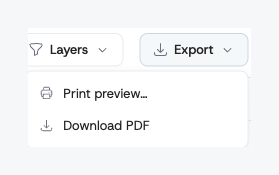
The file downloads immediately to your usual Downloads folder. The filename matches the one-pager's title.
The same dropdown still offers Print preview for the older in-browser print flow, in case you prefer to send to a printer directly from your browser.
What you get
Each PDF includes the same content you see on the one-pager view:
- The one-pager title and your organisation's logo.
- The strategy-context fields — purpose, vision, mission, company strategic ambition, and team ambition — in the same order as on the one-pager, wherever they're filled in.
- Pillars with their definitions of success and their initiatives.
- Enablers and company values, shown as labelled chips.
Section names in the PDF are the ones your workspace uses on screen. If your administrator has renamed or translated a section (for example "Pilíře" instead of "Pillars"), the export prints that name.
- A small footer with the generation date and your organisation name.
Bold, italic, and other Markdown formatting you've used in fields renders the way it does on screen.
Branding
If your organisation has uploaded a logo and set a brand colour in the admin panel, both appear in the PDF:
- The brand colour shows as a stripe across the top of the page and as a thin top bar on each pillar.
- Section labels (purpose, pillars, enablers, etc.) use a darker shade of the brand colour so they stay readable on a white background regardless of how bright your brand is.
- The logo sits in the top-right corner of the header band.
If neither is set, Alaigned falls back to its default green stripe and shows no logo.
Fitting your content on a single page
The PDF is a "one-pager" by name, so Alaigned tries hard to make sure it stays a single page:
- Most one-pagers fit comfortably on a landscape A4 page at full size.
- If your one-pager has a lot of vertical content per pillar, Alaigned tries portrait orientation next.
- If neither orientation fits at full size, Alaigned automatically reduces the text size in small steps until everything fits on one page. The text stays the same shape and brand styling — only the size changes.
For one-pagers with extreme density — many pillars and lots of initiatives and very long initiative descriptions — even the smallest readable size may not fit on a single page. In that case Alaigned produces the cleanest multi-page layout it can. If you see this happen and you'd rather it fit, the usual fix is to tighten your content — shorter initiative phrasings, fewer pillars, or moving detail out of the one-pager body into supporting documents.
Brand colours
The accent stripe and the per-pillar bars use your organization's brand colour. An administrator sets it — along with the logo that appears in the header band — in the organization settings. See Customising Your Workspace for the admin steps.
Tips
- The PDF includes the active strategy version. If you're viewing an archived version, export reflects that version's content.
- The export respects view permissions — anyone who can see the one-pager can download its PDF.
- The export is generated fresh each time. Edits made in the one-pager appear in subsequent exports without any cache flush.