Overview
Locking freezes a one-pager so its content can no longer be changed — neither by people editing it nor by changes cascading into it from a superior one-pager. Use it to protect a finalized strategy from accidental edits and to keep a key document stable while work continues around it.
Where to find it
Open a one-pager → Edit → the Settings tab in the insight bar. Locking is available to the one-pager's owners, to administrators, and to Program Managers.
What locking does
When a one-pager is locked:
- It cannot be edited. Anyone who opens it sees a read-only view with a One-Pager Locked banner.
- It stops receiving cascaded changes. Updates from its superior one-pager no longer land in it automatically — the locked one-pager is shielded from downstream changes.
- AI Guide is disabled for it — no AI recommendations are offered while it's locked.
One thing locking does not block: editors can still cascade the locked one-pager's existing changes down to its linked one-pagers. Outgoing updates keep flowing, so locking protects the document without cutting off the one-pagers that depend on it.
Who can lock a one-pager
Three groups can lock and unlock:
- Administrators and Program Managers, who hold the Lock One-Pagers permission across the whole organization.
- Owners, on the one-pagers they own and everything beneath them — see One-Pager Owners.
If you can neither see the toggle nor find the one-pager in the Approvals tab, you're not an owner of it; ask an owner, an administrator, or a Program Manager.
Locking or unlocking a one-pager
- Open the one-pager and click Edit.
- In the insight bar on the right, open the Settings tab.
- Toggle Lock one-pager on (or off, to unlock).
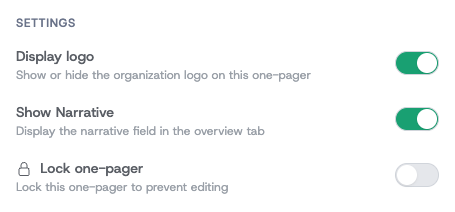
The change takes effect immediately. (The Settings tab is temporarily disabled while several people are editing the same one-pager at once — wait until you're the only editor.)
Working with a locked one-pager
A locked one-pager opens in a read-only state with a clear banner. Its content is visible to everyone as usual, but the editing controls are gone.

To make changes again, an administrator unlocks it from the same Settings tab.
Locking from the Approvals tab
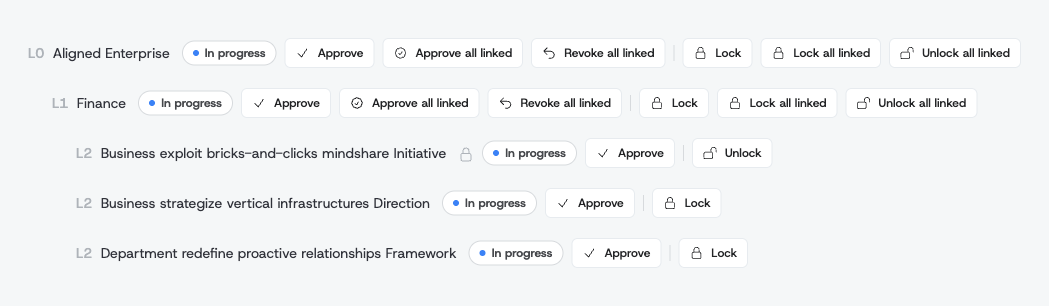
Besides the per-one-pager Settings toggle, administrators, Program Managers, and owners can lock and unlock from the Approvals tab in the organization admin section (Admin → One-pager Approvals). Alongside each one-pager in the tree you'll find:
- Lock / Unlock — toggle the lock on that single one-pager.
- Lock all linked / Unlock all linked — lock or unlock an entire subtree in one action, which is the quickest way to freeze a whole department once its strategy is finalized.
A locked one-pager shows a small padlock next to its title in this tree, and its Lock button becomes Unlock:
For the full Approvals workflow, see the One-Pager Status Lifecycle guide.
Locking and archived strategy versions
Archiving a strategy version makes everything in it read-only, so every one-pager in an archived version behaves as locked — regardless of its own lock setting. You can't unlock an individual one-pager in an archived version; an administrator must unarchive the whole version first.