Overview
Cascading aligns the strategy vertically — a superior one-pager pushes an initiative down, and each linked one-pager picks it up. But that leaves an obvious question unanswered: what are the other teams doing about it?
When one initiative cascades to several teams, each of them plans its own way to deliver it. Horizontal alignment lets you see those plans side by side — your team's next to your peers' — without leaving your one-pager.
It answers the questions that come up in every planning round: are we duplicating work? Has someone already solved this? Is anyone assuming we'll cover the part they left out?
Where to find it
Open your one-pager → Edit → find a pillar that was cascaded to you → click the peer icon in its top-right corner.
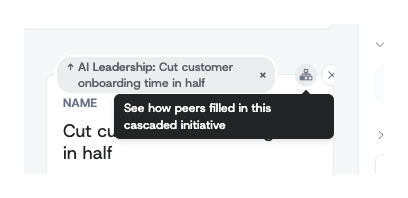
Hovering the icon confirms what it does: See how peers filled in this cascaded initiative.
When the icon is available
The icon only appears on a cascaded pillar — one that arrived from a superior one-pager — and only in edit mode. If you created the pillar yourself, there is nothing to compare it against.
If you are the only team that received the initiative, the icon is there but inactive, and reads No peers to compare on this cascaded initiative yet. It becomes active as soon as a second team accepts the same cascade.
Reading the comparison
The overlay shows the superior initiative at the top — the one everyone is working from — then one column per team:
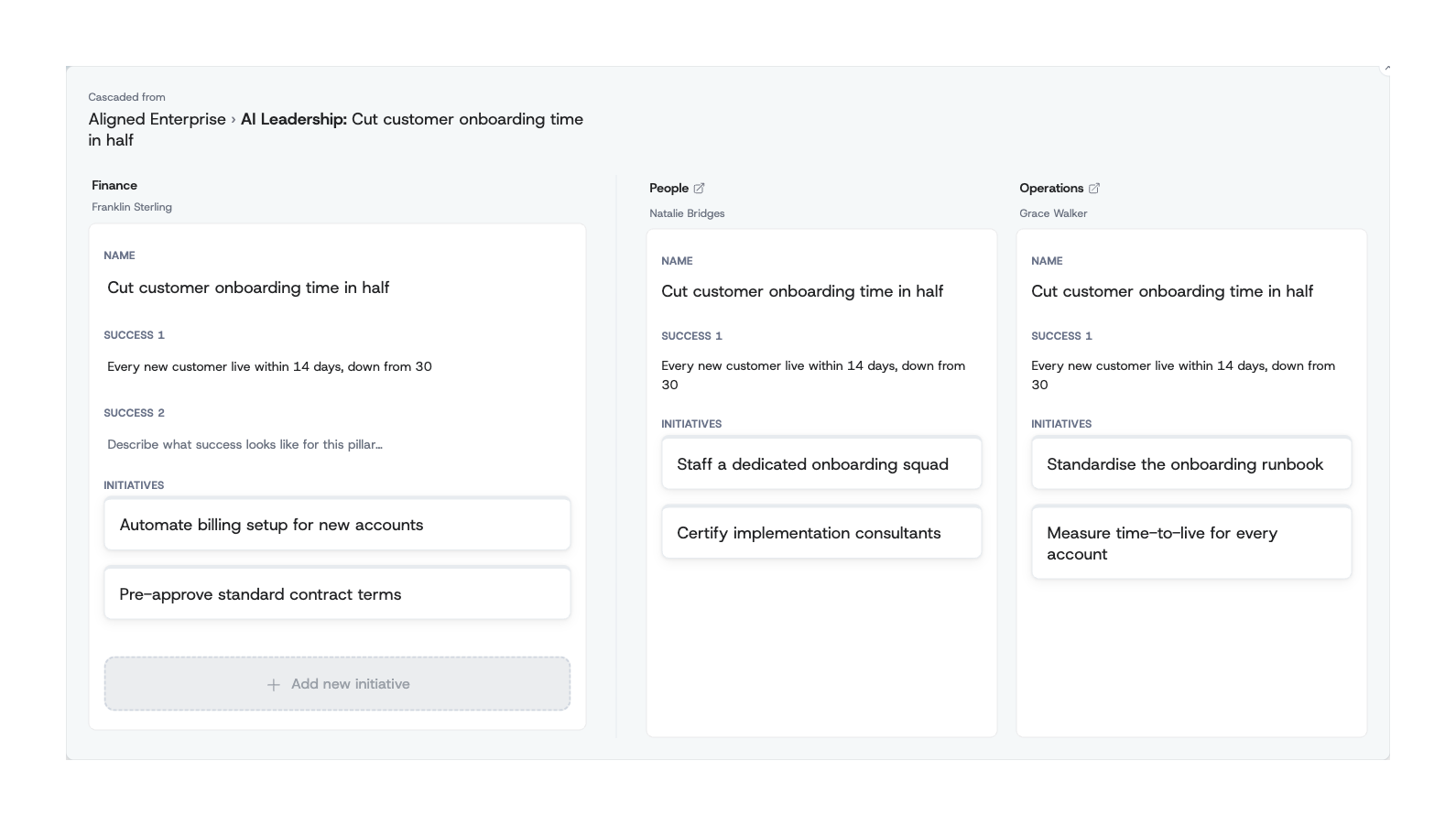
- Your team comes first, on the left, and stays editable. You can add an initiative right there while looking at what everyone else wrote.
- Peer teams follow, read-only, each labelled with the team name and the name of its owner — so you know who to talk to.
- Each column shows how that team named the work, what success means to them, and the initiatives they have planned under it.
Peers are read-only on purpose: horizontal alignment is for understanding your neighbours' plans, not editing them. Use the open-in-new-tab icon next to a team's name to go to their one-pager if you need the full picture.
Using it well
The comparison is most useful at two moments:
When you first receive a cascade. Before writing your own initiatives, look at what the other teams have planned. You will often find that someone has already committed to a piece you assumed was yours — or spot a gap that nobody has claimed.
When a plan changes. If your team drops or reshapes an initiative, check whether a peer was depending on it. The overlay makes those assumptions visible before they turn into a surprise at quarter-end.
In the example above, one company-level initiative — Cut customer onboarding time in half — is being delivered three different ways: Finance is removing billing and contract friction, People is staffing and certifying the team, and Operations is standardising the runbook and measuring the result. None of the three overlaps, and together they cover the goal. That is what good horizontal alignment looks like; the overlay is how you check for it.
Related
- Cascading Strategy One-Pagers — how an initiative reaches your one-pager in the first place, and how to accept, reject, or unlink it.
- Editing One-Pagers — adding the initiatives that appear in your column.
- To see where one of your initiatives went, use the Cascaded to breakdown instead — click the initiative and you get one card per team that received it.