Overview
Every one-pager has at least one owner — the person responsible for keeping it current. A one-pager can have several owners, which matters when two leaders share a function, when someone is on leave, or when a strategy is handed over.
One owner is always marked accountable. Ownership spreads the work; accountability keeps it clear who answers for the one-pager.
Where to find it
Open the one-pager → click Edit → the Owners button next to the title.
What owning a one-pager lets you do
Owners don't need organization-wide permissions. Owning a one-pager is enough to:
- Edit it — and everything beneath it in the hierarchy
- Approve it and the linked one-pagers below it
- Lock it, freezing it against further changes
- Cascade from it down to linked one-pagers
- Use the AI Guide on it
This applies to the one-pager you own and its whole branch of the strategy. If you own a department one-pager, you can work on every team one-pager underneath it without anyone granting you extra rights.
The Owners dialog
Click Owners to see everyone who owns the one-pager:
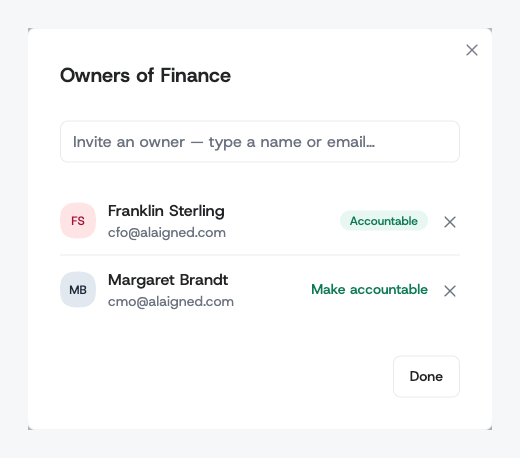
Each owner is listed with their name and email. The accountable owner carries an Accountable badge; everyone else shows a Make accountable link.
Inviting an owner
Type a name or email into Invite an owner and pick the person from the list. They become an owner immediately — there's no invitation to accept and no save step.
You can only invite people who are already members of your organization and hold a role that qualifies them as an owner — Enterprise Admin, Program Manager, or Enterprise Collaborator. Someone whose only role is Enterprise Viewer won't appear in the list until an administrator gives them a higher role, and someone without an account needs one first — for both, see User Management.
Changing who is accountable
Click Make accountable next to an owner. The badge moves to them, and the previous accountable owner stays on as a regular owner. There is always exactly one accountable owner: you promote a different person rather than clearing the field.
The accountable owner is the one shown under Owned by in the one-pager's Overview panel, and the one listed as owner in reports and in the organization's user list.
Removing an owner
Click the × next to an owner to remove them. They keep their account and any other one-pagers they own; they simply lose ownership of this one.
You cannot remove the last remaining owner — a one-pager always has someone responsible for it. To hand over completely, invite the new owner first, make them accountable, then remove yourself.
Owners and the rest of the strategy
- Ownership is per strategy version. Cloning a strategy version copies the owners along with the content, so next year's plan starts with the same people in place — see Strategy Versions.
- Deleting a member forces a handover. An account that still owns one-pagers can't be removed until ownership is transferred, so a one-pager never ends up orphaned — see User Management.
- Owners appear in the admin user list. The organization's Users tab shows the one-pagers each person owns, so you can see at a glance who carries how much.
Owners, Program Managers, and administrators
Three groups can act on a one-pager, for different reasons:
| Who | Scope |
|---|---|
| Owner | The one-pagers they own, plus everything beneath them |
| Program Manager | Approving and locking one-pagers across the whole organization, without full admin rights |
| Administrator | Everything, including organization settings, templates, and users |
If you just need someone to work on one team's strategy, make them an owner of that one-pager — that is narrower, and safer, than giving them an organization-wide role.